Scaling client apps with SDKs
At the start of any project, life is simple.
We create a services folder, add a few files to consume the API, and keep on building features.
src/
├── services/
│   ├── auth.service.ts
│   ├── users.service.ts
│   └── projects.service.ts
├── hooks/
├── pages/
└── components/
And honestly, it works really well — for months, for years.
The problem is that most architectures don’t fail when they’re small. They fail when they succeed.
What looks today like a clean, well-organized solution can turn into a constant source of duplication, inconsistencies and friction between teams as the product grows.
The approach we’ve all used
Most applications end up with something like this:
// services/users.service.ts

import { api } from '@/lib/api';
import { Profile, UpdateProfileDto } from '@/types';

export const userService = {
  async getProfile() {
    const response = await api.get<Profile>('/users/me');
    return response.data;
  },

  async updateProfile(data: UpdateProfileDto) {
    const response = await api.put<UpdateProfileDto, Profile>('/users/me', data);
    return response.data;
  },
};
// services/projects.service.ts
import { api } from '@/lib/api';
import { CreateProjectDto, Project } from '@/types';
export const projectService = {
async create(data: CreateProjectDto) {
const response = await api.post<CreateProjectDto, Project>('/projects', data);
return response.data;
},
async getAll() {
const response = await api.get<Project[]>('/projects');
return response.data;
},
};Then the components consume those services:
function ProfilePage() {
  const profile = useQuery({
    queryKey: ['profile'],
    queryFn: userService.getProfile,
  });

  return <Profile data={profile.data} />;
}
There’s nothing wrong here — in fact, for a single web app it’s usually an excellent solution. But the problem shows up when the product starts to grow.
When success complicates things
Imagine your product takes off.
You no longer have just a React application.
Now there are also:
- A React Native mobile app.
- An admin dashboard.
- A browser extension.
- Third-party integrations.
- Internal scripts to automate processes.
And they all need to consume the same API.
What usually happens is that each repository ends up developing its own version of:
users.service.ts
projects.service.ts
auth.service.ts
notifications.service.ts
At first it seems harmless.
After all, copying a few files takes five minutes. But over time problems start to appear.
-
One team fixes a bug in authentication.
-
Another forgets to apply the same change.
-
The mobile app implements automatic retries, the web doesn’t.
-
The dashboard interprets errors differently.
And suddenly the company has four different implementations of the same logic — not because the developers are bad, but because the architecture pushes them in that direction.
The shift in mindset
Companies that operate multiple clients tend to adopt a fairly simple idea:
Treat your own backend as if it were a third-party service.
Think of Stripe, Supabase, Firebase.
When you use any of these services, you don’t manually build HTTP requests in every application.
You install an SDK.
And you use its methods.
await stripe.paymentIntents.create(...)await supabase.auth.signInWithPassword(...)The question is:
Why not do the same with our own backend?
Introducing an internal SDK
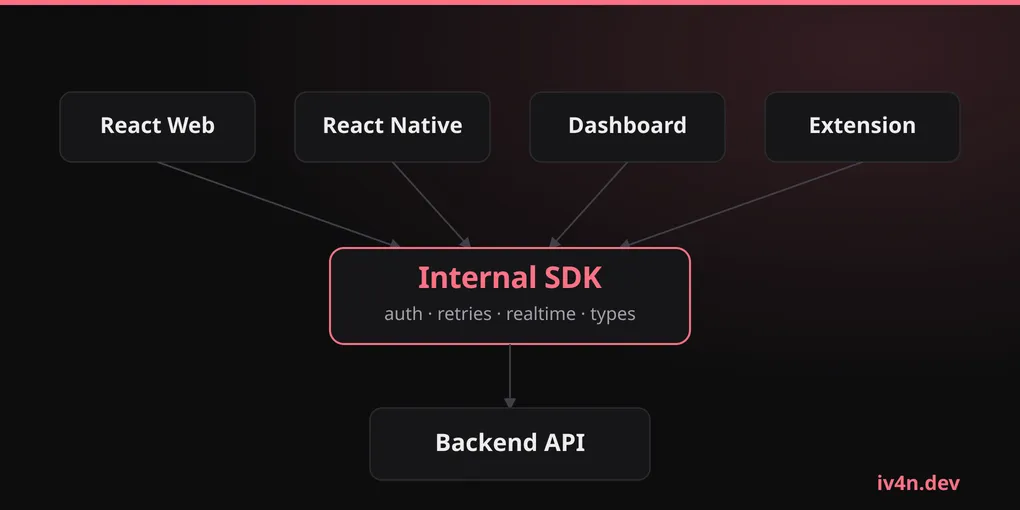
Instead of each application implementing its own communication layer, we build a single gateway for all clients.
┌─────────────────┐
│   React Web     │
└────────┬────────┘
         │

┌─────────────────┐
│ React Native    │
└────────┬────────┘
         │

┌─────────────────┐
│ Dashboard       │
└────────┬────────┘
         │

         ▼

┌─────────────────┐
│  Internal SDK   │
└────────┬────────┘
         │

         ▼

┌─────────────────┐
│    Backend      │
└─────────────────┘
Now the shared logic lives in a single place.
What does it look like in practice?
The SDK encapsulates all communication with the backend.
// @company/sdk/users

export const users = {
  getProfile() {
    return http.get('/users/me');
  },

  updateProfile(data) {
    return http.put('/users/me', data);
  },
};
// @company/sdk/projects
export const projects = {
create(data) {
return http.post('/projects', data);
},
getAll() {
return http.get('/projects');
},
};And from any application we simply consume those methods.
import { users } from '@company/sdk';

function ProfilePage() {
  const profile = useQuery({
    queryKey: ['profile'],
    queryFn: users.getProfile,
  });

  return <Profile data={profile.data} />;
}
The application no longer needs to know:
- Which URL the API uses.
- How tokens are handled.
- How the refresh token works.
- Which headers are required.
- How errors are managed.
- Whether the communication is REST, GraphQL or gRPC.
All of that stays hidden behind the SDK.
Much more than an HTTP wrapper
One of the most common mistakes is thinking that an SDK is simply a collection of functions for making requests.
In reality, it usually becomes the home of all the platform’s cross-cutting logic.
For example:
- Authentication management.
- Automatic session renewal.
- Automatic retries with exponential backoff.
- Consistent error handling.
- WebSockets and real-time events.
- Telemetry.
- Logging.
- Feature flags.
- Shared typing between backend and frontend.
In other words:
The SDK becomes the infrastructure that every application uses.
What you gain
Up to this point it all sounds pretty appealing.
And in many cases it really is.
The first advantage is consistency.
When a company has multiple applications, it’s very easy for each team to end up solving the same problems in different ways.
With an SDK, those decisions live in a single place.
If tomorrow you need to add a security header, incorporate telemetry or change the authentication flow, you update a single dependency.
Another huge advantage appears when the backend evolves.
If the SDK is generated from OpenAPI, GraphQL or gRPC, the contracts stay in sync automatically.
If an endpoint changes in an incompatible way, the error shows up during development and not when users are already using the application.
And perhaps the most underrated benefit is onboarding.
A new developer no longer needs to understand every internal detail of the platform.
They simply import the SDK and start building features.
What you pay
Of course, not everything is perfect.
SDKs have costs too.
When the frontend needs to consume a new feature, an extra step usually appears.
- The backend implements the change.
- The SDK is updated.
- A new version is published.
- The frontend updates the dependency.
If the process is automated, you barely notice it.
If it isn’t, it can create some friction.
There’s also an important risk.
Centralization.
If a faulty version introduces a bug in authentication or in request handling, every application that depends on that SDK will inherit the problem.
The very feature that makes it so powerful also demands discipline in maintaining it.
When does it make sense?
There’s a fairly simple rule.
If you have multiple applications consuming the same backend, you should probably start thinking about an SDK.
For example:
- React Web.
- React Native.
- Admin dashboard.
- Browser extension.
- External integrations.
In that scenario the shared logic grows so fast that the SDK ends up paying for itself.
On the other hand, if you’re building:
- An MVP.
- A startup still validating its idea.
- A single web application.
- A personal project.
You probably don’t need it yet.
A well-organized /services folder will still be the simplest and most productive option.
Conclusion
services folders aren’t bad.
In fact, they’re an excellent solution for a great many projects.
The problem appears when they try to solve challenges they were never designed for.
As new clients, new teams and new shared responsibilities appear, logic starts to duplicate across repositories and keeping consistency becomes increasingly difficult.
At that moment, an SDK stops being premature optimization and becomes a scalability tool.
Because the goal isn’t to abstract HTTP.
The goal is to build a single source of truth for all the infrastructure your applications share.
And when you reach that point, treating your own backend as if it were a product can be one of the best architectural decisions you make.